Review of the Collins COBUILD Advanced Learner’s English Dictionary CD-ROM
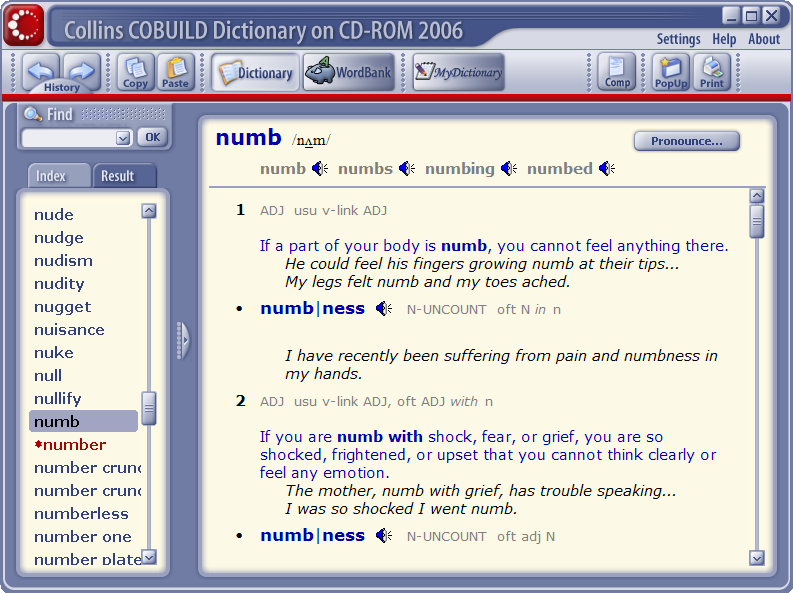
This review describes the 5th edition of the Collins COBUILD Advanced Learner’s English Dictionary CD-ROM (published in 2006). This edition has phonetic transcriptions and works better than the 4th edition (2003). As of January 2009, the 5th edition is still available online (scroll down for links).
Warning: The latest, 6th edition of this dictionary (published in 2008) is completely different software: in fact, the slowest and buggiest PC dictionary on the market. It also has no phonetic transcriptions and no Wordbank. Do not buy under any circumstances!
The content
We love software dictionaries, so we were very excited to learn about the software version of the excellent Collins COBUILD Advanced Learner’s English Dictionary from HarperCollins Publishers. As we expected, the CD-ROM has the same great definitions and example sentences as the paper edition. You can read more about them in our review of the book version. Here, we’ll just quote part of it:
When you look up a word in a dictionary, you should be interested in what the word means. But you should also ask the question “What can I do with it?”. The [Collins COBUILD Advanced Learner’s English Dictionary] answers this question very well by giving the most important phrases and grammar structures containing the word — both in the definition and example sentences. Together, the definition and the example sentences give you an almost complete picture of how a word is used in the English language.
The CD-ROM also contains a “Wordbank” — a collection of sentences from English-language books, articles, conversations, etc. The Wordbank is part of the “Bank of English”, a much larger collection which HarperCollins used to create the definitions and choose the example sentences in the dictionary.
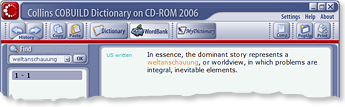
The Wordbank is a very useful thing. It gives you lots of example sentences, and, if you are a reader of Antimoon, you should know that example sentences are the proper way to learn English words. The Wordbank is especially helpful when the dictionary doesn’t explain a word, or when it doesn’t give enough example sentences. For example, the dictionary does not explain weltanschauung, but we found a nice example sentence in the Wordbank (see picture to the right).
Phonetic transcriptions
The 5th edition of the Collins COBUILD Advanced Learner’s English Dictionary finally has phonetic transcriptions. For more details about the system used, see our review of the book version.
Recordings
The software has British audio recordings for all words. American recordings are available only for some words, for example:
Here are some words for which only a British recording is available (even though all these words are pronounced differently in American English):
We liked one thing about the recordings: You can listen to all the forms of a word (only in British English). For example, in the page for open there is a recording for open, but also for opens, opening, and opened. Many learners pronounce such inflected forms incorrectly, so the recordings can be helpful.
The software lets you record your own speech and compare it with the recordings. This is a helpful feature, because it lets some learners notice the mistakes they make in pronunciation. Of course, because the dictionary contains so few American recordings, the feature will be useful mostly for learners of British English.
Looking up words
You will love the fact that this dictionary lets you look up words really quickly. You can simply type a word and press Enter. You never have to press an additional key beforehand. With most dictionaries, you have to click on a text box every time you want to look up a word. When you look up a lot of English words (and you should), it’s just an annoying little thing that you have to do 100 times a day. Fortunately, the developers of the Collins COBUILD were smart enough to eliminate it.
Still, the search does not always work perfectly. For example, if you try to look up the phrase “fall to pieces”, the dictionary will show the page for the word fall. The page has explanations of 21 meanings of the word and you have to find the right meaning yourself (“fall to pieces” is number 20).
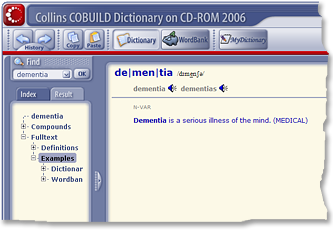
The dictionary has an integrated, lightning-fast full-text search. For example, when you search for dementia, it automatically finds not only the main entry, but also:
- compound words, e.g. senile dementia
- all the entries which have the word dementia in their definition
- all the entries which have the word dementia in the example sentences (e.g. umbrella has this example: Within the umbrella term `dementia’ there are many different kinds of disease)
- Wordbank sentences with dementia (14 sentences)
With quick access to so many examples, you can gain a much deeper understanding of a word.
Install to hard drive
The setup program has an “install to hard drive” option. In our opinion, the option is necessary for every serious learner. Here’s why:
If you want to learn a lot of words, looking them up should be easy. If it’s too hard, you will ignore many words because you will be scared of the time and effort (do you like finding words in a huge book?). This means that your dictionary should be quickly available. You should be able to look up a word in a few seconds. An application on a CD is not “quickly available”, because:
- It takes time to insert the CD into your CD-ROM drive.
- Even when it’s inserted, a CD works more slowly than a hard drive.
It is therefore good that the Collins COBUILD Advanced Learner’s Dictionary can be installed to your hard drive without any problems.
Copying & pasting
In the 5th edition, you can finally select part of a page and copy the selection to another program, for example to your SRS collection. This was impossible in previous editions.
General software quality
The software feels fast and reliable. On my 2.4 GHz Intel Core 2 Duo machine, it starts quickly, and definitions appear as soon as you press Enter. Memory usage is modest. In general, the Czech developers (Lingea) deserve praise for making the speediest English dictionary for advanced learners. The competition from Cambridge, Oxford and Longman is much slower.
The only significant bug that I’ve found is that I wasn’t able to scroll pages with the trackpad on my laptop. The mousewheel works fine.
Conclusions
| PRO | CON |
|---|---|
|
|
The fifth edition of the Collins COBUILD Advanced Learner’s English Dictionary CD-ROM is highly recommended. However, learners interested in American English should also consult a more trustworthy source of information, such as the free Merriam-Webster Online dictionary.
Prices
Today you can get the following versions of the Collins COBUILD Advanced Learner’s English Dictionary:
- 5th edition, hardcover+CD
- 5th edition, paperback+CD
- 5th edition, CD only
- 6th edition, book+CD — This version is very poorly made. Not recommended.